
Business email security
5 Signs Your Email Is Compromised
Worried your email is compromised? Unfamiliar sign-ins, messages you did not send and unexplained account changes all deserve attention. This guide explains five warning signs and the practical next steps for a small business.
One odd message does not prove a breach. Check the evidence and report suspicious activity promptly rather than waiting for several signs to appear.
Suspect an active compromise? Contact your IT administrator through a trusted phone number or another safe channel. Do not approve unexpected sign-in requests or use links in a suspicious alert to log in.
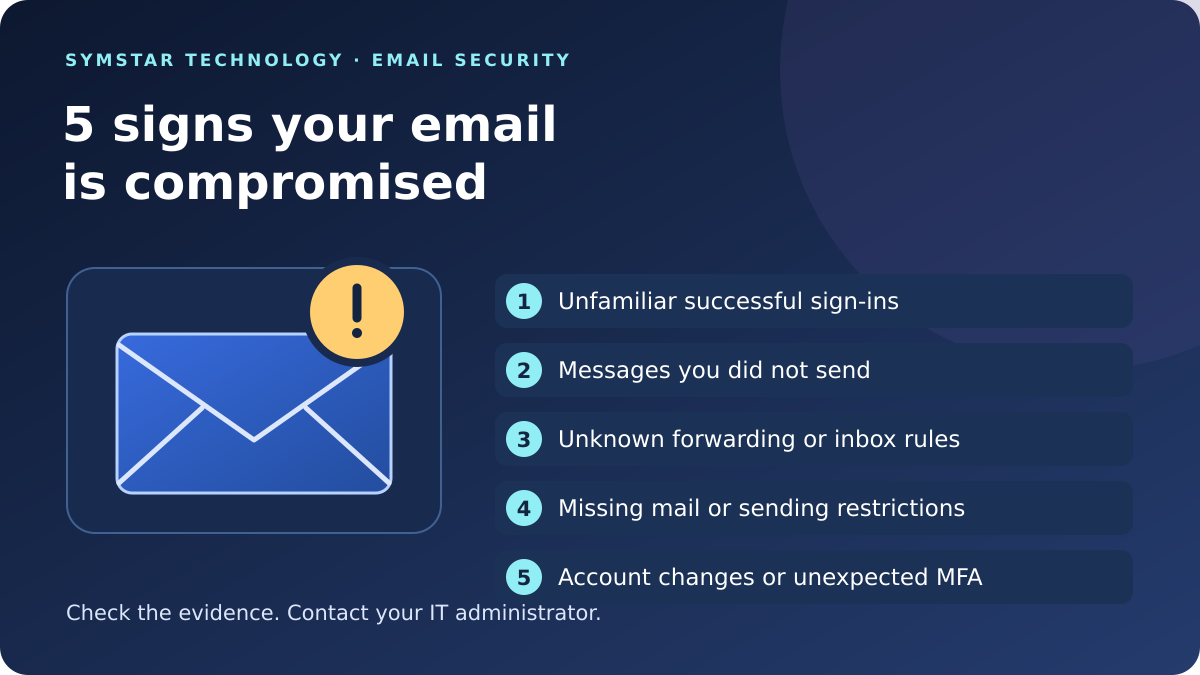
5 signs your email is compromised
1. Successful sign-ins you do not recognise
A successful login from an unfamiliar device, app or time can indicate unauthorised access. Review the details with your IT administrator, especially if the activity does not match your working day.
Location alone is not reliable proof: mobile networks can make a legitimate login appear to come from elsewhere. A failed attempt also does not mean someone got in. Compare the browser, device, application and result. Microsoft explains these checks in its work or school sign-in activity guide.
2. Customers receive messages you never sent
A customer may report an unexpected attachment, payment request or unusual reply apparently from you. Check Sent Items and Deleted Items for unfamiliar messages and ask your administrator to investigate the original email.
An address can also be impersonated without access to the real mailbox. Treat the report seriously, but establish whether your email is compromised before drawing a conclusion. Ask the recipient to preserve the message and verify any payment request using a known phone number.
3. Unknown forwarding or inbox rules appear
Look for forwarding to an address your business does not recognise, or rules that unexpectedly move incoming messages out of sight. These changes can be a warning that your email is compromised.
For example, a rule could hide customer replies while you continue receiving ordinary mail. Tell your administrator which rule looks unfamiliar and when you noticed it. Record the details so they can compare the setting with any legitimate business changes.
4. Important mail disappears or sending is restricted
Missing emails, unfamiliar deleted messages or an unexpected restriction on sending can indicate suspicious mailbox activity. These symptoms are included in Microsoft’s compromised account guidance.
There can also be ordinary delivery or account problems. Make a short record of the affected messages, times and error notices. That helps your support team investigate the cause without assuming every email problem is an attack.
5. Security details change or unexpected MFA prompts arrive
An unrecognised recovery address, authentication method or password change needs urgent investigation. If you unexpectedly lose access, contact your administrator or follow the account provider’s official recovery process.
Repeated approval prompts that you did not initiate are another warning to report. Deny unfamiliar requests and use the reporting option if your organisation has enabled it. An unexpected prompt indicates a suspicious attempt; by itself, it does not confirm that your email is compromised.
What to do if your email is compromised
Respond promptly and let your IT team coordinate the investigation. A routine settings review should not delay action on an account that may already be under someone else’s control.
- Report and record. Share the affected account, the time you noticed the problem and the warning signs. Keep relevant messages and screenshots for investigation. Avoid circulating sensitive mailbox contents widely.
- Contain access. For a business Microsoft 365 account, an administrator can block sign-in, reset the password and revoke active sessions as appropriate. They should also review authentication methods and connected applications.
- Check mailbox changes. Have suspicious forwarding and inbox rules investigated and removed. Changing a password alone does not undo every account setting an attacker may have altered.
- Protect other accounts and devices. Replace reused passwords, review important linked accounts and check devices for malware. Use a trusted device for recovery and follow your provider’s instructions.
- Warn affected contacts. Coordinate a clear warning if suspicious messages were sent. If a fraudulent payment was made, contact the bank promptly using its official details.
The NCSC account recovery guide explains general recovery steps. Microsoft 365 work accounts and personal Outlook.com accounts have different support routes, so use the guidance that matches your account.
Reduce the risk of another email security incident
After recovery, review how your team signs in and how suspicious activity gets reported. Use strong, unique passwords and multi-factor authentication, or suitable passkeys where supported. Keep devices and apps updated.
Give staff a clear way to report concerns early. Verify requests to change payment details through a separate trusted channel. Review access when people join, leave or change roles, and check that administrator permissions remain appropriate.
For ongoing help, explore Symstar’s email and phishing protection and Microsoft 365 security support.
Email compromise FAQs
Does an unfamiliar location mean my email is compromised?
No. Check the full sign-in details. Approximate locations can be misleading, and unsuccessful attempts are different from successful access. Ask your administrator to review activity you cannot explain.
Is changing my password enough if my email is compromised?
A password change is part of recovery. Active sessions, authentication methods, application access and mailbox rules may also need attention. Follow your provider’s recovery process with your IT administrator.
Can these signs apply to Gmail as well?
Yes. Unfamiliar devices, changed security settings and unexpected sent messages can affect other providers too. Google publishes its own compromised account recovery guidance. Business accounts should also be reported to the organisation’s administrator.
Further reading: NCSC guidance on securing business email and Microsoft guidance on reporting suspicious MFA activity.
On this page
If Your Email Is Compromised: Record What You Observed
Start by separating observations from conclusions. Record the unusual message, notification or account behaviour, when it appeared and what the employee was doing at the time. Explain whether an unexpected message was merely received, a link was followed or information was entered. These are different situations. Avoid assuming that every suspicious email proves an account has been accessed, but take the concern seriously and use the organisation’s approved reporting route.
If your email is compromised or you suspect it may be, provide a concise account to the authorised administrator. Exclude passwords, recovery codes and unnecessary customer information from ordinary correspondence. Keep relevant evidence available through an agreed secure process. A useful report gives the support team enough context to assess the concern without requiring the employee to investigate unfamiliar settings alone. Record the support reference and the person responsible for the next action.
If Your Email Is Compromised: Identify the Account Owner
Business email can involve a named user, shared mailbox, delegated access and more than one service provider. Identify the organisation that owns the account and the administrator responsible for it. Explain which supplier manages the email platform and which provides user support. This helps route the report correctly, particularly when the employee has both personal and business accounts or uses several mailboxes through the same application.
When your email is compromised, a clear ownership record helps avoid uncoordinated changes by different people. Account recovery and security actions should follow the authorised organisation or provider process. Do not send sign-in secrets through ordinary messages or follow recovery instructions supplied by an unverified correspondent. Use known contact details and official guidance. Keep the reporting record separate from credentials so managers can track the investigation while sensitive recovery information remains available only to authorised participants.
If Your Email Is Compromised: Explain Business Impact
Tell the incident contact which activities depend on the affected mailbox. Examples include customer enquiries, supplier correspondence and shared team work. Explain whether another authorised employee can continue those activities through an approved arrangement. Identify time-sensitive decisions without including entire confidential conversations unnecessarily. The organisation needs to understand operational impact alongside the technical concern so the appropriate people can coordinate the response.
If your email is compromised, managers may need input from account administrators, security specialists and business owners. Record which contact is coordinating the incident and how further observations should be supplied. Keep assumptions visible: an unavailable application, suspicious message and confirmed unauthorised activity are not interchangeable descriptions. Update the report when reliable new information becomes available. A practical impact summary supports prioritisation and communication without making unsupported claims about what information an attacker has accessed.
If Your Email Is Compromised: Handle Unexpected Requests
A suspicious request may ask employees to change bank details, provide a code or approve something unusual. Explain exactly what was requested and whether any action was taken. Use a known independent contact route to check business instructions rather than relying on details supplied in the questionable message. Follow the organisation’s existing approval process and involve the responsible manager when a request affects payments or confidential information.
When your email is compromised or someone is impersonating a contact, employees should avoid circulating the message as an instruction for colleagues to follow. Report it through the approved process with the relevant context. Record who received the request and which business task it concerned, without assuming every recipient acted on it. Separate a suspicious message from confirmed consequences. This helps the organisation coordinate any follow-up using evidence instead of creating confusion through broad, unverified warnings.
If Your Email Is Compromised: Organise Evidence Safely
Ask the authorised incident contact what evidence is needed and where it should be supplied. Relevant information may include the time, affected account, visible notification and a description of unexpected behaviour. Avoid collecting unrelated employee or customer material merely because it is accessible. Keep copies and notes within the organisation’s approved handling process, with access appropriate to the investigation and the sensitivity of the information involved.
If your email is compromised, do not improvise a public evidence folder or send credentials to a new contact claiming to provide urgent support. Verify the recipient and purpose through a known route. Record the origin of each observation and distinguish employee recollection from information checked by an administrator. Clear evidence handling supports a consistent investigation and gives the business a more reliable account of the incident than a collection of screenshots with no times, ownership or explanation.
If Your Email Is Compromised: Coordinate Staff Updates
Identify who is responsible for communicating with employees during the incident. Staff need clear instructions about reporting new concerns, using approved alternatives and avoiding unverified requests. Keep messages proportionate to what is known. An internal update can describe an investigation without claiming that every account or customer record is affected. Give employees one reliable reporting contact so information reaches the person coordinating the response.
When your email is compromised, the organisation should agree how updates will be provided if the usual mailbox is unavailable or unsuitable. Use approved channels and known contact details. Keep private investigation findings limited to those who need them, while general instructions remain understandable. Record the date and owner of each update so staff know which guidance is current. Consistent communication reduces the risk that colleagues act on an old instruction or mistake an unofficial message for the organisation’s response.
If Your Email Is Compromised: Review Supplier Responsibilities
The support provider, email platform and specialist security service may have different responsibilities. Record which supplier controls account administration, who can investigate the relevant environment and who coordinates vendor cases. Check the service hours and escalation process in the existing agreement. An active concern should be reported through that agreed route rather than assuming a general sales enquiry creates an emergency response arrangement.
If your email is compromised, keep supplier references and unresolved dependencies in one incident record. Ask who will confirm the next action and how progress is communicated. Distinguish completed tasks from findings still under review. A business owner should understand when additional assessment or specialist work needs separate authorisation. Clear responsibility helps avoid parallel investigations that duplicate work, obscure evidence or leave each provider assuming that another party has taken ownership of an important decision.
If Your Email Is Compromised: Confirm Normal Work Carefully
After authorised corrective actions, agree how normal business activities will be checked. An employee being able to sign in again is a useful observation, but it does not by itself answer every question about the incident. The administrator should explain which checks have been completed and what remains under investigation. Ask the user to validate only the representative activities they are authorised to perform, through the agreed process.
When your email is compromised, record the outcome of these checks and any exceptions. Keep unresolved concerns assigned to responsible contacts rather than assuming the case is finished because one symptom disappeared. Explain any temporary working arrangement and when it will be reviewed. Retain the incident reference for later observations. A clear return-to-work record helps managers distinguish restored access, continuing investigation and additional improvement tasks without overstating the certainty of the result.
If Your Email Is Compromised: Learn From the Report
Arrange a proportionate review after immediate response work has been handled by the authorised team. Discuss what employees noticed, whether the reporting route was clear and where coordination was difficult. Focus on useful process improvements rather than blame. Separate verified findings from assumptions that were made during the first report. This gives managers an understandable basis for deciding what needs attention and which questions still require specialist assessment.
If your email is compromised, follow-up may include clarifying staff instructions, improving ownership records or reviewing the agreed support scope. Prioritise recommendations against the actual findings rather than buying tools solely because their names sound reassuring. Assign an owner and review date to approved work. Keep incident information within the organisation’s handling process. A practical review should leave staff better able to report a future concern and managers better able to coordinate the people responsible for assessing it.
If Your Email Is Compromised: Prepare for a Support Conversation
Before contacting an authorised support provider, write a brief timeline and identify the affected business account. Explain the unexpected activity, what the employee did and which normal tasks are disrupted. Include the relevant incident reference if someone is already investigating. Do not submit passwords, security codes or unrestricted copies of mailbox contents through a general enquiry form. The purpose of the first conversation is to establish context and the appropriate assistance route.
If your email is compromised or you are unsure about a warning sign, make the uncertainty explicit. Ask what information can be supplied safely and which work falls within the existing agreement. For a conversation with Symstar Technology Ltd, state whether the request concerns active suspicious activity or a planned review. Agree the scope and reporting process before assuming an appointment or response commitment exists. Keep the next action, responsible contact and open questions visible so the organisation can follow the concern through to a documented outcome.


